
How to take attendance report in Zoom
1. Sign in at the Zoom web portal using the account that hosted the meeting.
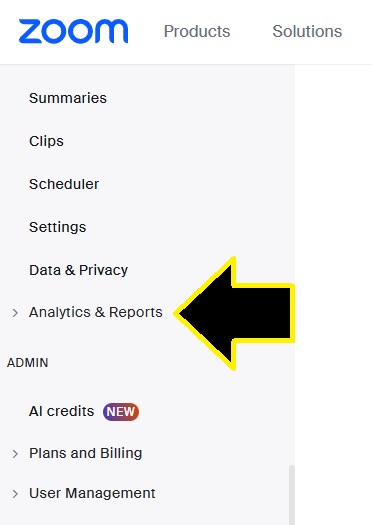
2. Go to Analytics & Reports → Meetings & Webinars or Reports → Meeting and Webinar History.
3. Select the meeting date range and click Search.
4. Find the relevant meeting.
5. Under Participants, click the participant number.
6. Review the names, email addresses where available, joining time, leaving time, and total duration.
7. Select Show unique users to combine participants who left and rejoined.
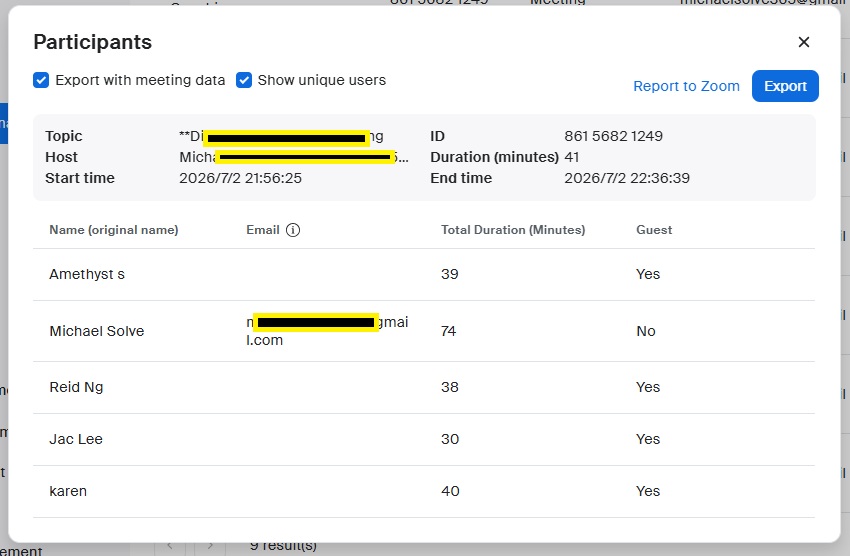
8. Click Export to download the attendance report as a CSV file.
Important:
The report normally appears about 15 minutes after the meeting ends. You must be the meeting host, account administrator, or have reporting permission. Attendance reporting is generally available to licensed Zoom users for meetings they hosted.